**EDITED** Real World Ramblings Of The ‘Improved’ Multitasking Android Runtime On Jolla **EDITED**

It appears that the memory issues I had been experiencing (mentioned in the article below) have been addressed by Jolla in the latest software update 9, earlier today (22/10/14) including the following:
Memory handling
-
The low memory killer is now properly killing Android applications according to their set priority
-
In addition to that, certain thresholds for when memory killer should kick in has been added
NB. With this in mind you can largely ignore the rest of this article. Thanks.
For a while now I have been using the new android runtime system (since July’s Tahkalampi update) on my Jolla which allows for separate multitasking panes or cards to be handled individually on the homescreen.
This was a much requested ‘feature’ from the community and one that made sense on many levels, but after some real world usage how does it really stack up ?
Well it is clear from experience with other Android devices and now after using various apps on Jolla that many of these Android apps are very resource hungry and for me at least have so far caused the most battery drain and system lag (due to memory overload) on my Jolla.
The previous system utilised by Jolla worked much the same way as Android does where you load an app and that then becomes the app in the forefront, however upon loading a new (Android) app, the previous app was put into a state of “suspense” so that it used very little RAM ie. not true multitasking. The previous system made accessing the previously opened Android app(s) accessible via the “card” button which would bring up all the open apps for you to select which one you wanted to navigate to next (from within a single recent app pane hosting all recent Android apps in one area). The downside (and perhaps upside) of this system was that the “suspended” app would go into a freeze state so when you next accessed it, the app would reboot ie. app is not subjected to live refresh.
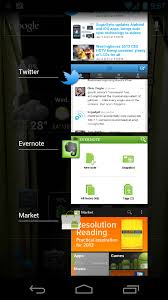
Original Android Recent App “Multitasking” Accessed By Card Button On Far Right
This “old” system in fact was not a true multitasking system when compared with the behaviour of Sailfish native apps which each have their own “space” on the homescreen, however it was (IMO) an efficient way of dealing with the power/RAM hungry Android apps and one that Android OEM manufacturers utilise themselves (even with the benefit of higher RAM flagship models). In fact even the alternative 2 main OS’s (IOS and Windows Phone) operate using this “suspend-upon-launching-new-app” recent app approach where true multitasking (ie. apps constantly running in the background), is dropped in favour of this simplified system.
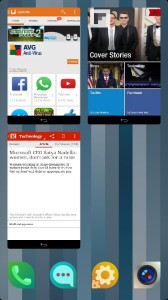
New Android Multitasking View On Jolla Homescreen
So the question is: if handsets with far larger RAM/processor power at their disposal are not using a true multitasking approach in Android, why should Jolla ?
Well the benefits are, for example, should you require constant refreshing of a certain Android app that is unavailable in native format (eg. skype) you can have that without affecting the constant running next time an Android app is launched. In essence, no Android app will be put into a state of “suspense” until you decide to exit said app which of course has it’s plus points.
The obvious downside however is that the more of these resource heavy Android apps we have running simultaneously, the more laggy and drained the system becomes. The only OS that offers a similar approach to Jolla (with regard Android) is Blackberry’s BB10 which also allows for true multitasking of Android apps. However, the majority of Blackberry BB10 devices are manufactured with higher RAM specifications probably to deal with this precise issue.
So the options we/Jolla have available to cut down the affect off these “resource heavy” Android apps are as follows:
1/ revert to original “one card” Android runtime system for the time being in order to prevent system overload
2/ keep the new system but be aware of the problem and constantly “kill” unused android apps to maintain system resources at optimal level in order to prevent further battery drain and lag
3/ speed up native app development to replace the unintegrated, resource hungry Android substitutes
It goes without saying that point 3 is needed regardless and should be of utmost priority. It is problems like this which will hopefully incentivise developers to come up with native solutions that integrate beautifully and run optimally with our much loved Sailfish OS.
Having used the new system for a few months now, I would happily revert to the old system (option 1) combined with a big jump for option 3 in order to kurb my general reliance on Android apps.
How do your experiences with the new, revised android runtime compare ?

Latest posts by JollaTides (see all)
- #Jolla Tablet Campaign: Last Chance To Order + Juicy Perks - December 8, 2014
- #TOHKBD: Go, Go, Funky Configurator! - November 28, 2014
- #Jolla Tablet: Campaign Adds Bulk Retailer Option And Stretch Goals! - November 27, 2014



 Uli S. on


 Robert Southern on

 venu on




I think the best solution would be an optional hybrid. You could have a slider that allowed you to set how many android apps you could have at once, 1, 2, 4, 8, unlimited.
This way you could have a best of both worlds, and maybe by default use a more reasonable 2 or 4 instead of unlimited.
But removing the feature, for me, would be very bad. It’s one of the most important features for me, after a qwerty keyboard, which is why I’m still on an android with a qwerty, but honestly true multitasking it’s one of the things I miss the most from the N900 and that really draws me to the jolla.
That also sounds like a good compromise ianjo. :) Obviously I was only focussing on android app multitasking/management in the article.
The Sailfish way of true multitasking with native apps would remain unchanged (same as N900). ;-)
I don’t know how Sailfish multitasks Android apps but I think your description of how Android multitasks is incorrect. Android does not suspend apps put into the background. On my Nexus 7 I can quite happily run something like VxConnect to SSH into remote servers, browse, vnc into a desktop and switch between them and each will maintain a live connection. Android only shuts stuff down if you run out of RAM.
A quick Google gave me this page as a description of Androids model.
http://www.extremetech.com/computing/112013-how-multitasking-works-on-android-and-ios/2
“Android only shuts stuff down if you run out of RAM.” This is what I was getting to and maybe wasn’t too clear in the article. Whichever way you look at it, the original system i believe managed the system memory better, however the new system has no upper limit cap and therefore when resources (RAM) are overstretched Sailfish starts to act strange ie. laggy, random freezing etc.
The old (tried and tested) system, negated this by never allowing you to push beyond the boundaries of possibility, keeping Sailfish largely stable.
Besides, correct me if I’m wrong, but isn’t it so in Android that apps are only kept “alive” and working in background only if they themselves utilize a demonizing process or thread that takes care of that job. Otherwise they are truly backgrounded, frozen, even if they are allowed to keep their freezed state (e.g. not restarted completely when resumed). The state I assume is like swapping them out of memory out to secondary storage and then back in again when resumed.
To be even more specific after reading a little: An android process is typically working under the UI-thread, relying on that threads responsiveness and ability to run. When backgrounded an application is given then chance to save it’s state, it is called in the onPause() method to do that work. Once restored it is able to restore that state using onResume(). That’s fine, that’s not real multitasking on that real sense, but it has the ability to construct a sort of background job / service, and the most common way is to use the IntentService in which the app. can perform critical tasks that must remain even when it is backgrounded. Still, not true multitasking but rather a workaround to the whole Android principle. Why can’t Jolla do the same even with the several cards principle. If app is switch, let it swap out complete from memory (and save state of course), let the new app run. But keep the LAST app in memory, if it is resumed let it run as it was. Only if a different app is chosen, then do the whole swap-out swap-in shebang. Wouldn’t that work?
Thats the reason Im holding back to buying my Jolla phone. I would have thought it would come with at least 2GB RAM. Like my Z10. Android apps run fine on it even if I leave it in the background. I know its too late now but I hope Jolla 2 will have at least 3GB RAM to keep up with Android Apps. Now I know that Sailfish is very frugal when it comes to RAM consumption but Android is not.
To be able to run both Sailfish and android apps simultaneously a Jolla device should have at least have twice as much RAM as a typical Android device and hence urgently needs to be able to run on 64-bits cpu’s. Perhaps a 64-bit Jolla host “emulating” a 32-bits Android guest.
Hmmm… it seems the Blackberry folks have had this better worked out. Though I reckon the problem remains there as well.
Anyway the problem is that Android’s development won’t stop either. By this time next year Android devices with more than 4GB RAM and 64-bits multi-core cpu’s will be more common than both Jolla and/or BB-devices. Eventually Android will be the Windows on mobile devices and Google will replace Microsoft as the no.1 software developer. I really doubt that Sailfish OS can counteract this.
Unless the folks at Jolla have this foreseen and were secretly working on a bomb. The perfect and most powerful 64-bit SailFish OS that blows everything out o/t water.
In that case the Jolla 2 phone will be something like…
– 6,5″ QHD IPS ulta-triliminous screen, gorilla glass 4 layer
– octa core ARM A64 BIG-BIG architecture
– 8GB Dual channel GDDR6 memory (used for both GFX and system RAM)
– 128GB SSD internal micro SSD drive
– micro-SD card slot fully UHS-1 compliant
– micro USB3.0 universal reversal plug
– USB OTG
– bluetooth 5.0 ULP
– Wifi A/C + WiDI + DLNA
– Smart IRdA
– NFC2
– FM radio + DAB radio
– full range Quad speakers with true surround + Dolby technologies Virtual octa-sound.
– LTE cat6 with VoiLTE conference call (min. 8 users)
– complete button-free operation.
– inductive- and magnetic charging
– 41MP Toshiba sensor with Zeis optics (5MP, 8MP, 12MP and 16MP pureview modes)
– 2x PV-zoom, 4x digital Zoom with “superior auto” oversampling
– NASA approved space-age titanium alloy outer shell with nano-tech watercoating and silicon shock resistant inner lining. Both high altitude, low oxygen and submerged operation upto 5 meters and minus 30 degrees Celsius. Still not upto Siberia level but hey, it’s a phone right!
– battery charged in 30 minutes and last for 5 days 24h/day heavy duty operation.
And of course delivered in a hand carved wooden box with at least 4 smart-covers and a signed thank-you letter from Marc Dillon. With free hologram sticker containing the Jolla logo for “the first ones”
Than we’re talking :-)
Why not just an option to suspend an app that you don’t need to be active in the background? Could even work generally – both for Android and native apps
After further consideration, maybe my slight ‘lag’ issue is related to high internal storage usage? I have use almost 11gb of 13.7gb available. I’m going to try and run some optimisations as suggested in this thread: /forums/discussion/178/phone-memory-filling-up-and-apps-crashing-solution
Are you sure that the way Android applications behave in terms of multitasking changed at all? It was my understanding from the information given about this change that only the presentation of the application windows changed, nothing else. This is also in line with my obserations about what happens when I push them into the background: pending operations do not continue, there’s no live update to the cover (which seems to be a screenshot only) and no CPU usage. The only thing that’s not released (at least not until needed) seems to be RAM, but I don’t remember the way it was before… And I have yet to run into a situation when I run out of RAM. (Tried with quite a few Sailfish and Android apps open, never exceeded 80%)
The new multitasking was a real improvement!
We are short before 9th update. Is this article a preview what is coming? So the author will prepare us for the downgrade, because he knows some internals?
Going back to old version will be one more disapointment for me, under the many lacks sailfish still have. They should fix them instead of programming around on good things!
Pingback: Real World Ramblings Of The ‘Improved’ Multitasking Android Runtime On Jolla | Jolla Phones & SailFish OS